Beautify Your iTunes Movie Collection
I’ve said it before, I’m a real stickler for organization. For some odd reason, my Music collection must contain only full albums, with correct covers and ID3 tags. I just can’t stand having anything out of place. Even with this sort of near-OCD, I’ve for the longest time had a mass of Movies and TV Series’ on my computer in various formats (DivX, XviD, etc) and various resolutions. All sorted only by filename.
Thankfully, I discovered that iTunes serves as a downright excellent means for managing all this (the Movies and TV Shows tabs aren’t for nothing). Sure, it would take some time to convert my collection from random formats to MP4, but with great tools like Stomp (beautiful icon and interface) and VisualHub (not-so-beautiful icon and interface), but the outcome definitely worth it.
I painstakingly (over many weeks) converted all my media to H.264 at an iPod classic-compatible 640px wide resolution and a relatively high bitrate, then using the wonderful MetaX filled out the futuristic meta-data of each file, giving my movies automatic gorgeous covers and other details.
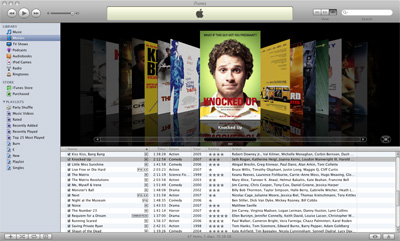
Finally, with a properly-sorted media library I can sleep soundly. Sure, it means when I download acquire new Movies and TV Shows I need to convert and tag them, but that only adds an extra few hours. It’s well worth it.


It’s nice to know im not the only one whos OCD about these kinda things.
I used to be anal about having all complete albums until I started running out of space on my iPod… Now I’m only anal about having full albums for artists I really like.
Also, is there much noticeable quality loss when you convert your movies from one lossy compression codec to H.264?
@Matt - To my eye, the quality loss when converting already-compressed video to H.264 is really not noticeable, as long as the original video is of relatively high quality (no artifacts etc), it’s really fine. H.264/AVC is a brilliant codec in my experience.
Wow. I’m equally happy to meet someone with this obsession. Thanks!
I have a friend with around 6,000 (yeah you heard me right), acquired songs in his iTunes library and he hasn’t bothered to include proper album/artist/track data for hardly any of them.
And then he complains that it’s hard to find the song he wants, and to add album art to them; it would take an entire summer to organize that mess!
I, however, share your obsession - each and every song in my collection has all of the available data and album art. But haven’t got around to my movies and TV shows yet…
There’s been several movies that I’ve been tempted to add to my iTunes collection but have been reluctant to do so because of the amount of space that it’ll take. I don’t have an Apple TV at the moment and I don’t find myself watching movies on my MBP that often. Nevertheless, I am a neat freak and so regardless of what I decide to do later on, you get bet it’ll be well organized as well.
Followed your advice on this post a couple of weeks ago and it really work out for me. Visual hub is a great app when you have a fast computer. I had so meny movies on diffent formats now I got them all on iTunes ready for my Apple Tv and Iphone. Thanks! great post!
I have 30,000 tunes all with cover art.