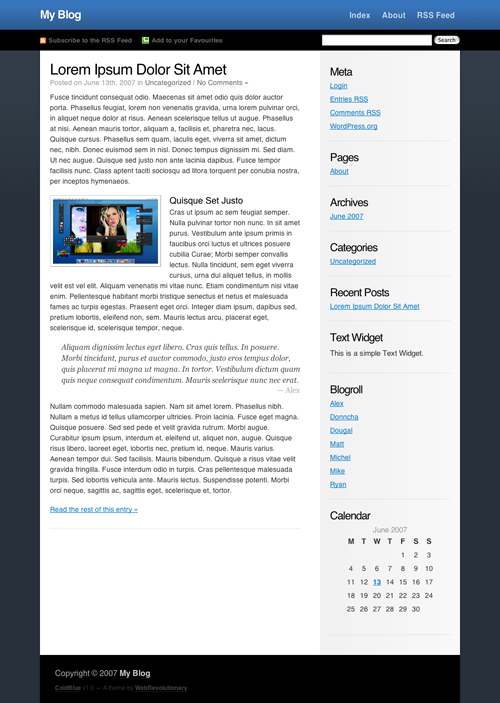
ColdBlue Wordpress Theme

ColdBlue is a WordPress Theme created to be aesthetically pleasing, open, minimalistic and easy to use. It is absolutely free to download, however if you enjoy the theme please consider making a donation, which will go towards further development of ColdBlue and future themes (which will always be free). Any amount would be greatly appreciated, just click the button below.

Get Coldblue

Download ColdBlue 1.2

Update Log

  • 1.2.0 Modified: No longer using relative font sizes
  • 1.2.0 Fixed: IE font-size problems
  • 1.0.3 Fixed: “Bigger child” font-size issue. Only affected nested categories in sidebar.
  • 1.0.2 Modified: Screenshot and Theme directory name.
  • 1.0.1 Fixed: Internet Explorer 6 Font Size (Thanks Small Potato)
  • 1.0.1 Fixed: Nested pages breaking header (Thanks Small Potato)
  • 1.0.1 Fixed: Technorati “Add to your Favorites” link. en-us spelling and href.

Preview

ColdBlue Wordpress Theme

Usage Notes

  • To align an image within a post to the left or right, give it a class of float-left or float-right respectively
  • Valid XHTML & and bugless in modern browsers
  • Subscribe to the RSS Feed to stay up to date with future releases and updates

162 Responses to “ColdBlue Wordpress Theme”

  1. Glenn Wolsey:

    Looks very nice, I like your web style - simple and elegant. Keep up the good work.

  2. Aleks:

    wow very nice!
    possibly i will modify the colors and use it for my new private blog! :)

  3. Small Potato:

    Nice theme Matt. I’m testing it right now. I think you should apply depth=1 to wp_list_pages in the header. it looks unorganized when it has to display more than one level of links and you can’t really tell which child pages belong to which parent pages.

    Also, the font size is inconsistent in IE6 (about 4px bigger).

    A few more fixes to make it look like the preview screenshot would make Cold Blue an excellent theme.

  4. Matt:

    @Small Potato - I’ll get right on to making those fixes.
    I’m quite new to WordPress theming, so it’s great to get some help from a pro :)

  5. Steven Campbell:

    Nice and clean - I like it.

  6. ColdBlue Theme v1.0.1 — WebRevolutionary:

    [...] Anybody want a Joost invite?The Web 2.0 ClicheSharpfolio: Wordpress Portfolio ThemeColdBlue Wordpress Theme [...]

  7. Kaizenlog » Blog Archive » Wordpress 15/06/2007:

    [...] ColdBlue Wordpress Theme By Matt Usage Notes. To align an image within a post to the left or right, give it a class of float-left or float-right respectively; Still working: on Ultimate Tag Warrior Compatability, Attachments; This is quite an early version, … WebRevolutionary - http://webrevolutionary.com [...]

  8. 月饼:

    thanks for your theme.

  9. Eli:

    Now that’s a beautiful theme…
    Will find a use for this!

    Many thanks ;)
    -Eli

  10. ColdBlue WordPress Theme » WPDesigner:

    [...] Download ColdBlue [...]

  11. Hans:

    Great theme. Testing it right now. It would be great to have a live preview though. Have you thought of putting it on the official Wordpress theme viewer. You can have direct access for the moment without someone validating your registration first.

  12. yapblog:

    Schönes WP Theme ColdBlue…

    Bei WebRev gibt es ein echt schönes und sauberes Wordpress Template. Hätte ich das mal eher entdeckt ;). ColdBlue wird jedenfalls gebookmarkt.
    [via]
    ……

  13. 21 Fresh, Usable and Elegant Wordpress Themes | Smashing Magazine:

    [...] 23. Coldblue [...]

  14. Nicholas:

    Nice theme! I’m using i on my blog right now, and I love it! Any chance of a three-column version? My sidebar’s kinda crowded.

  15. ajbatac:

    Please fix the overflow for images. ;)

    ex:
    http://www.phpugph.com/blog/2007/05/28/ilike-on-scaling-its-all-facebook/

    Thanks.

    –aj

  16. Jenny:

    Pretty nifty theme. I like it. I think I’ma use it for my site.

  17. sindhu:

    love it!

  18. PowerUp Coaching:

    Hi Matt,
    Just tried your great looking theme, but got this error message when I fired it up:

    home/…/wordpress/wp-content/themes/ColdBlue/searchform.php on line 2

    What’s that about?

    Lou

  19. PowerUp Coaching:

    oops, left out the first part of the error message…here’s the full error:

    “Fatal error: Call to undefined function: the_search_query() in home/…/wordpress/wp-content/themes/ColdBlue/searchform.php on line 2″

    Thanks,
    Lou

  20. alex:

    Thats a nice theme, congratulations!! :)

  21. Kate:

    I love your theme, Matt.
    I installed them in my site.
    And for PowerUp Coaching, error you found also found while i’m installed theme. And I think i know why this error came out, it’s because wordpress version.
    I have error in sidebar.php, when i look up, such as categories use wp_list_categories, in version under 2.1 use wp_list_cats
    For searchform, i’m still wondering. For moment i’m not using search form.

  22. 21 Fresh, Usable and Elegant Wordpress Themes | Webdesign (css, grafica e altro):

    [...] 23. Coldblue [...]

  23. Roman:

    Layout is convenient to read. Colours: nothing interesting.

  24. mik:

    Hi, I think this is one of the better WP themes.
    validates as xhtml scrict.
    only thing needs some edits is the sidebar
    for the rest very nice theme!

  25. mik:

    It seems with Internet explorer all the font weights are bolder. anyone have a suggestion to fix this ? thx

  26. Best Wordpress Themes:

    Hi. This really is one of the most impressive Wordpress themes I’ve been able to find — and I’ve been hunting around! Well done!

    I wanted to let you know that I’ve included your theme in my new site, which points to the best WP themes around the web: http://www.bestwpthemes.com.

    Congratulations!

  27. kiviniar:

    Thanks, using it here a little differently :-)

    http://www.idirectorynetwork.com/

  28. Jon:

    Liking this a lot - clean and crisp, well done!

  29. Tech Flakes » 23 freschi, semplici e stupendi temi per Wordpress:

    [...] 23. Coldblue [...]

  30. Web2 tool» Blog Archive » 10 WordPress theme:

    [...] ColdBlue WordPress tema Autore: Matt [...]

  31. Matt Kelly:

    Very nice theme and layout!

    I like it.

  32. mk1990:

    I have just installed the theme and it comes out with a css, i dont know why, my website is http://www.mk1990.info

    Is there any editing required?

    Cheers

  33. Kate:

    Mik, to fix all the font weights just edit css file, and change font-size em to px.

  34. wpSnap - The Very Best of WordPress! » Cold Blue:

    [...] Links: Download | Demo | Theme URI [...]

  35. Weblog Tools Collection » Blog Archive » WordPress Theme Releases for 8/6:

    [...] ColdBlue is a 2-column, dark theme. [...]

  36. Temas para WordPress para el 6 de agosto - Carrero Bitácora de los Hermanos Carrero, David Carrero Fernández-Baillo y Jaime Carrero Fernández-Baillo.:

    [...] ColdBlue es un tema de dos columnas en colores oscuros. [...]

  37. 6 Good WordPress Themes « The Way To Happiness:

    [...] ColdBlue is a 2-column, dark theme. [...]

  38. Will:

    Nice theme. Beautiful nice and clean layout!

  39. Nico Nemil | Web Developer | Web Designer | Graphics Artist » WordPress Theme Releases for 8/6:

    [...] ColdBlue is a 2-column, dark theme. [...]

  40. ToonV:

    There’s some serious IE7-font-fuckup going on with your theme. On firefox everything looks fine, but when viewing the theme on IE7 the font is waaaay to big.

    It gives me the impression that the text is YELLING at me with mouth spread.

  41. ColdBlue Updates, Milestones & New Things — WebRevolutionary:

    [...] want a Joost invite?ColdBlue Wordpress ThemeSharpfolio: Wordpress Portfolio ThemeThe Web 2.0 [...]

  42. 6 Yeni Wordpress Teması 07/08/2007 | CMS, Seo, Hit Kazanmak, Hazır Scriptler, Photoshop, Temalar:

    [...] ColdBlue 2 sutunlu koyu renklerin hakim olduğu bir tema. Mavi ve gri renkleri kullanmış. [...]

  43. Two themes I hate and one I love:

    [...] Third theme, the one I love - ColdBlue [no live demo yet] [...]

  44. » Themes elegantes para Wordpress | Informática Práctica |:

    [...] 4. Cold Blue [...]

  45. Joe Bloom:

    I have a couple questions;

    Why can’t I edit the stylesheet within Wordpress? It’s just a blank “style.css” file with a comment in it.

    Also, the fonts on the theme to me are alike Georgia rather than how they seem in the preview and how I’ve seen them on other peoples blogs using the same theme.

    Appreciate feedback.

    Cheers.

  46. Theme: I Love Wordpress for Blogging | ozlady.com:

    [...] Cold Blue [...]

  47. Scott:

    Hi,

    Thanks for this theme, I think it’s great. I’m not a web designer but I’d like to add a picture to the header area and after a few hours of trying, have not had any success. I’m hoping someone would be able to point me to the right code!

    Thanks in advance.

  48. Hiroshikeny:

    Hi,
    Thanks for good theme.

    However,I face the problem with Mozilla firefox about sitebar locate.

    Could you help and suggest me ?

    Thanks in advance.

  49. thelocomonowebsite » Blog Archive » Astore Page:

    [...] it will work with other WordPress themes, I have been able to work it into WebRevolutionary’s ColdBlue theme as you can see by visiting my Astore [...]

  50. thelocomonowebsite » Blog Archive » TheLocoMono Week 6:

    [...] you can see, there is a new look for this website, ColdBlue.  I was really getting tired and annoyed with the old WP theme, Silver Light because of the poor [...]

  51. Mark McGuire:

    Matt,

    I came across your theme about a week ago through WPDesigner’s website. I have to say you have done an excellent job with it. Muchas Gracias.

    I have two questions,

    The first is when I added my Astore page, the footer disappeared from every other page except for the Astore, is there something I am not seeing in the code?

    The other question, I am afraid to test it out but will the header increase in depth if I add more pages to the navigation area in the header? Or will I need to adjust the code for a deeper header to show additional pages?

    Once again, great job.

    Mark

  52. egorych:

    Thanks for this cool theme. I’ll test it :)

  53. blooWorld | WordPress Themes & Plugins » Blog Archive » ColdBlue Theme:

    [...] Preview | Download | Visit [...]

  54. PeterVog:

    Hi there,

    This is such a great theme that I would love to use it, but I was wondering if anyone could help a relative WP newbie:

    - I have the same problem as “Joe Bloom” — the fonts are nothing like the preview. I see a css directory that was unpacked under the ColdBlue theme directory and in it there exists few .css files. Am I supposed to do anything to these to get this to work correctly?

    Any of you folks who got it working: can you let me know if it was ok for you right out of the box?

    Thanks!
    PeterVog

  55. giovanealex:

    Hi!
    I’m trying to modify this theme to meet my needs but I’m stucking on a strange problem. I removed all the stuff inside the blue and black parts on the header and I’m trying to insert an image there as the blog title as well as an image menu on the top right but absolutely nothing appears there - they are all invisible because one I move the mouse over where the top menu should appears the cursor assumes there is link there but it is hidden. I wanna put a right menu, similar to the top one too, but that is a “plus” - the main issues are the image title and the top menu.
    Could you help me an any way, please? I’m sending links of one image of what I have and another showing what I wanna do for you to understand me better.
    Thanks in advance for any help you can give me!

    http://img208.imageshack.us/img208/5158/whatihaveof8.jpg

    http://img208.imageshack.us/img208/1166/whatiwantmx1.jpg

  56. Best Wordpress themes | KJ's nara:

    [...] Cold Blue: Beautiful typography and nice blue colour tones make this Web 2.0 style theme stand out from the crowd. [...]

  57. Mustafa:

    I love the elegant, yet bold design

  58. JLGoolsbee.com » Blog Archive » I have a website?:

    [...] to find a clean and good-looking theme I liked that I could build on, and I finally found it. ColdBlue by WebRevolutionary is a very well laid out theme, and it was relatively easy to modify the design [...]

  59. Beach:

    我下载使用了,Thanks!

  60. sohbet:

    thanks verry good

  61. John:

    For anyone that may be wondering where the style.css is located for the code blue template I am listing it here. For some reason its not in the usual spot

    To get to the template:
    /wp-content/themes/ColdBlue/css/style.css

    If you want to be able to edit the template from your admin panel, just do the following.

    1) Open up the header.php file and change the path to the style.css file
    from:
    …/css/style.css to /style.css

    2) next move the style.css file from the css directory to the template home directory overwriting the current style.css file.

    After this if your permissions are set correctly you should be able to edit your css file directly from the admin panel of your website.

  62. JC:

    Nice and clean thank you

  63. Yong Hwee:

    Very simple and clean! Might use it in future.

  64. ylh:

    The theme is very nice,I like!

    http://www.sujiaoban.com/blog

  65. Cold Blue « Wordpress Gator’s Weblog:

    [...] Download ColdBlue [...]

  66. FYI - Upgraded Look | TheLocoMono:

    [...] recently upgraded to the latest Cold Blue theme which was developed by Web Revolutionary.  It appears to have been cleaned up and modified a [...]

  67. Mark McGuire:

    Matt,

    Great work on the new version, very clean and much smoother.

    Don’t forget to update your version info from v1.0 to v1.2 in the footer (see below).

  68. 6 Yeni Wordpress Teması 07/08/2007 | Rasim Coşkun | Web Tasarım | Web Design:

    [...] ColdBlue 2 sutunlu koyu renklerin hakim olduğu bir tema. Mavi ve gri renkleri kullanmış. [...]

  69. 6 Yeni Wordpress Teması 07/08/2007 | Rasim Coşkun | Web Tasarım | Web Design:

    [...] ağırlıklı 2 sutunlu bir tema, Live demo’suna tıklayarak temayı inceleyebilirsiniz. ColdBlue 2 sutunlu koyu renklerin hakim olduğu bir tema. Mavi ve gri renkleri [...]

  70. Frank:

    Thanks for this nice Theme. I use it for the Order of Leibowitz.

  71.   21 Cool and Beautiful Wordpress Themes by techigeek | technology news and internet news:

    [...] 23. Coldblue [...]

  72. Ingo:

    First of all: I really do like the look of your theme,
    … so I tried it, but it didn’t work on my site. I’m still using Wordpress 2.0.10 and will be updating soon. Will that do the trick?
    Actually all I see is the header, and when I look on the source code the search-div is not closed and everything after that is just not coming. (today is October 25th as you’re not showing the dates of the posts here ;)
    Maybe you could check on your ‘latest-theme.zip’ for me? Thanx.

  73. Mark Lamerton:

    Beautiful theme. I’m testing it here:
    http://blog.marklamerton.com/

    I have a question. I have tags (in addition to categories) on my posts but they do not show up on my blog with this theme.

    Thanks, Mark

  74. Dave:

    Matt,

    First of all, a superb theme. Thanks!

    I’ve made some minor changes you might want to consider for the next version:

    - background.gif was pretty big, so I’ve changed it to 1px wide;

    - header_background.gif was pretty big too, so I’ve changed it to 1px wide;

    - wrapper.gif was again pretty big, so I’ve changed it to 1px high;

    That brings the total image size down to about 6kb rather than about 45kb :)

    I’m using your theme on my site (http://davehope.co.uk) so feel free to grab the images and use them in the next release if there is one.

    I’m probably going to compress the css too, but only once I’ve read through it and know which classes are in which file.

    Thanks again,

    Dave

  75. Dave:

    Ohh, and this is for Mark Lamerton:

    Mark, you’ll need to change the_categories() to the_tags() in single.php, page.php and index.php. For example:

    Dave

  76. vista themes:

    awesome theme , thanks .

  77. Liz:

    Hi All,

    I have modified this theme and am using it on my site: http://www.myersdesign.com/wordpress/

    Just one problem ie6 doesn’t format my sidebar, header or footer graphics properly. All is ok in FireFox and Safari. Any suggestions? Please help I am a perfectionist and this is driving me batty. ;-)

    Cheers, LM

  78. Canadian Pharmacist:

    Very nice theme, clean and well-organized. And if there are any bugs I think everybody can fix them by themselves…

  79. Regretful neglect — WebRevolutionary:

    [...] want a Joost invite?ColdBlue Wordpress ThemeSharpfolio: Wordpress Portfolio ThemeThe Web 2.0 [...]

  80. twigged.net » The best things in life are free:

    [...] Blue » Preview | Download | By Web [...]

  81. J. Stafford:

    This is the perfect design for a blog..clean and matches my theme…thank you!

  82. Jenny:

    ooo yay this is what I wanted to do for my new theme. Thanks.

  83. Pablo Augusto:

    Thanks for theme!

  84. Isq:

    Thanks for a new look. Now it is simple and easy.

  85. isk:

    thanks for new wordpress look. Now it is simple and easy.

  86. Fath:

    Nice and neat! Love it! :)

  87. All About Paul Ocal » Blog Archive » Hello World!:

    [...] I gave in. I gave in to this new culture, blogging! I’ve been thinking about starting my own blog for a while now and I finally started one. I’ve been reading blogs since the early days of Gizmodo (my favorite tech blog) and recently have been reading a lot on freelancing.I’m really excited about this. I think this blog will help me get more organized and manage my time more efficiently. Lately I’ve been having trouble concentrating just because I don’t know the status of most of what I’m trying to get done. As of now, I’m not sure if I want this to be public yet, so I won’t be advertising this to anyone just yet.Please bare with me till I grasp this concept of blogging and master WordPress (which was the easiest thing to install - I LOVE IT!). I will be polishing this blog up as soon as I find the time. As for now, I’ll be using ColdBlue from WebRevolutionary. [...]

  88. My Top Thirty Wordpress Themes : Speckyboy - Wordpress & Design:

    [...] webrevolutionary.com Author: [...]

  89. 更换了一下本站的主题 | Dreamcolor's Cote:

    [...] ColdBlue [...]

  90. 网上商城:

    thanks

  91. links for 2007-12-04 | Alex McArthur.com:

    [...] ColdBlue Wordpress Theme — WebRevolutionary (tags: wp-themes) [...]

  92. Sicarii:

    Thank you for this simple and clean theme.

    I love it and am using it on my blog with a few modifications.

    http://www.sicarii.net

  93. Andy:

    Oh, and did not know about it. Thanks for the information …

  94. e-okul:

    thanks for this theme ;) its really good

  95. 本博客正式转为WordPress at Once Blog:

    [...] 终于经不住WordPress的诱惑,OnceBlog正式由Z-blog转换到WordPress。 其实一直在找一个好空间,并且能适合问我的。本想能淘个国外免费的空间先撮合着,不过虽然找到了可用的,但还是被我放弃了。国外收费空间虽然性价比极高,而且稳定,但是穷学生我还是没有足够的Money出手,大部分都是年付,而且人民币对美元这笔数目不小。 只能瞄准国内的Linux空间了,因为须支持mod_rewrite,在网上搜了个遍,CPH合租服务器,还有盘古和WordPress中文的合租主机,虽然和适合架设WP博客,但价格都偏高了些,而且盘古的服务器在重庆网通机房,我这边速度不是很好,本地ping其提供的合作主机演示站点www.qqtag.com为340ms,速度无法让我满意。 最终选择了梦游的ME-100空间,近来梦游的口碑还不错。而且这款主机和适合我,100M容量,15G/月的流量都能满足我的要求,选电信线路,网速很不错,而且梦游提供其他线路的镜像。一主机上能建两站点。 我在梦游的论坛上发现了zhizhe提供梦游主机优惠,他提供了我个88折优惠,而且还热心帮我解决了几个梦游主机上装WP遇到的问题。在此感谢zhizhe,并推荐下有兴趣的朋友可以找他优惠购买梦游主机。 至于由Z-blog转WordPress的方法,我是参考月光的方法,上传月光的movabletype插件,导出为MT格式,再在WP里从Movable Type 或 TypePad Blog 中导入数据。具体操作规程可以参照这里。整个过程十分简单。 转WP后,我更改了链接的显示方式。参考众多WordPress Permalinks设置的文章后,最后选择现在的URL输出方式,原因是这样的方试我比较喜欢。 关于主题的选择,测试时已经修改了好几个自己蛮喜欢的二栏主题,大概是原先的Z-blog用的是三栏的吧,现在对二栏的主题一直情有独钟。最终还是看上了选择了简洁的Cold Blue,感觉很些符合我的风格。而且支持Widgets,自己修改了一部分CSS,在某些细节上稍微修改了些,就启用了。现在对此主题的留言栏不够满意,过几天再对此进行下修改。 回顾下,在使用梦游空间装WP后,遇到的几个问题: 1.Permalink Redirect和PageNavi这两个插件存在冲突,同时开启后,分页栏链接无效,而且提交数据,数据库服务器老是报错。我开始一直不明原因,鼓捣了很久才发现是这两插件的冲突问题。禁用Permalink后,正常。 2.一些文章的内容无法显示。不论在index页,single页,文章标题和发布信息,tags等能显示,但内容始终无法显示。到现在我还不明原因,最后是重装WP,重新导入数据才解决的。估计是哪里的设置破坏了数据库。 [...]

  96. Jon Moss:

    Hello! Is there any simple way of getting my email sign up form to fit better on my blog http://www.theappleofmyi.com/blog ???
    Any help would be great!
    Thanks,
    Jon

  97. 100 Excellent Free WordPress Themes | Developer's Toolbox | Smashing Magazine:

    [...] Coldblue [...]

  98. 100个优秀的免费 WordPress 主题 | 煎蛋:

    [...] Coldblue [...]

  99. 100个优秀的免费 WordPress 主题–Labfan-Just for Learning AB Fan!:

    [...] Coldblue [...]

  100. Blogs en el PNTE » Archivo del blog » Cuatro nuevos temas para la plataforma de blogs del PNTE:

    [...] otros dos temas, Accord y Cold Blue, tienen un diseño más simple, pues sólo cuentan con sendas barras laterales, que también [...]

  101. WP-SuperBlog.com » Blog Archive » ThemeSwitcher - WordPress Plugin Repository - Trac:

    [...] ColdBlue Wordpress Theme WebRevolutionaryBlueprint is a WordPress Theme for the discerning. … Signified is using the Blueprint WordPress Theme by Signified. Powered by WordPress. … [...]

  102. WP-SuperBlog.com » Blog Archive » Justin Tadlock Facebooked: Wordpress Theme:

    [...] ColdBlue Wordpress Theme WebRevolutionaryI definitely use one theme or two for my blogs..malaysia boleh! hehe do you have any plan of creating wordpress theme specially for 50th independence day? ; … [...]

  103. N多个wordpress模板 : 转角»爱:

    [...] Coldblue [...]

  104. estetik cerrahi:

    Very nice theme. I recommend it.

  105. Owen:

    I love the theme and I am using it in another site
    http://socemot.com

    However, when I click on Presentation, and Theme Editor, and then Stylesheet to change a bit of the style I only get this

    /*
    Theme Name: ColdBlue
    Theme URI: http://webrevolutionary.com/coldblue/
    Description: ColdBlue - A WordPress theme created by WebRevolutionary.
    Version: 1.2
    Author: WebRevolutionary
    Author URI: http://webrevolutionary.com/
    */

    Where is the stylesheet? This is where I go to modify it correct? There is a tiny admin panel problem but i doubt it could be causing this. I just want to add a transparent picture to the background of the blue header and give the background of the body a slight texture, the grey area.

  106. 100个精挑细选的免费WordPress主题推荐 - 菠菜博:

    [...] Coldblue [...]

  107. Diseño web:

    Good enough to digg, thanks

  108. Pedro Diogo » Blog Archive » Novo Look:

    [...] tema foi adaptado do tema ColdBlue, não foi feito por mim, talvez por falta de paciência, porém teve bastantes [...]

  109. 100 Excellent Free WordPress Themes | Chloee:

    [...] Coldblue [...]

  110. 100 Free Premium Wordpress Themes:

    [...] Coldblue [...]

  111. Jacob:

    First of all, this is a great wordpress theme. Being a PHP developer myself, I’d have to say you write really clean code and markup. I happened into your theme through several sites listing your theme as a great design! I’m now using it on one of my blog sites, modified — at http://www.gearcentric.com.

    Question about version 1:2: This is nitpicky, but I’m trying to learn more about Wordpress theming…

    In index.php, lines 29 - 33, why did you decide to break these up into three php blocks:

    If there’s no reason behind it, and it’s simply your preference, to each his own, but if there was a reason, I’d really love to know, just for my own education.

    Thanks, and amazing job on this theme!

  112. Jacob:

    I think your comment system doesn’t like php blocks, completely understandable, I’ll try to obfuscate the code a bit.

    Here they are, index.php lines 29 - 33:

    “”

    “”

    “”

  113. tokat yeşilyurt:

    thanks

  114. forum:

    perfect theme. really beutiful.
    congratulations!

  115. aydın kız öğrenci yurdu:

    tema foi adaptado do tema ColdBlue, não foi feito por mim, talvez por falta de paciência, porém teve bastantess

  116. Theme: I Love Wordpress for Blogging : OzLady’s Ramblings:

    [...] Cold Blue [...]

  117.   100个精挑细选的免费WordPress主题推荐 by Endlessnet personal blog:

    [...] Coldblue [...]

  118. Joshua:

    “…you’ll need to change the_categories() to the_tags() in single.php, page.php and index.php. For example:….”

    I don’t quite understand this. I am also trying to display tags but am not able with this theme.

  119. chatsel:

    tenks

  120. Reynder (Webdesign):

    Nice and clean.

  121. Michael Snyder:

    Thanks for this - I appreciate the effort. Makes things easier for those of those don’t know how. I have probably tried hundreds of themes and this is one of two that really worked for me.

    Thanks again.

  122. cialis:

    Thaks for very some times good posts

  123. plastik:

    Great page. Very useful information for me.

  124. AEODAR:

    thanks verry good

  125. prefabrik ev:

    Thank you for nice page.

  126. acomplia:

    This is the perfect design for a newblog..
    cut clean and matches my theme…

  127. 100 Excellent Free WordPress Themes | PaulSpoerry.com:

    [...] Coldblue [...]

  128. Lancashire Website Designers:

    At last, back to a nice professional, clean looking WP theme. - Great look, many thanks.

  129. magay:

    Blue - a noble colour. I like it.

  130. 31 Professional WordPress Themes » Webmaster-Source:

    [...] ColdBlue [...]

  131. Internet Marketing - Best Web Ezy:

    A very clean theme. Easy on the eyes. Really appreciate your effort.

  132. 31个专业的Wordpress模版 | The sky of Daemon!:

    [...] 19、ColdBlue [...]

  133. 31个专业的Wordpress模版 - MyEss.cn:

    [...] 19、ColdBlue [...]

  134. 专业的Wordpress模版 | Lin's空间|Only:

    [...] 11、ColdBlue [...]

  135. mirc sohbet:

    tenksee

  136. 强烈推荐31个国外专业的Wordpress模版下载 at 第九城市:

    [...] 19、ColdBlue [...]

  137. WPCandy » WebRevolutionary.com Relaunched:

    [...] mostly focused on design, technology, and the web. WebRevolutionary is probably most known for the ColdBlue and Sharpfolio WordPress themes released in mid 2007. Most importantly, WebRevolutionary is powered [...]

  138. Wp Wordpress » Blog Archive » WebRevolutionary.com Relaunched:

    [...] mostly focused on design, technology, and the web. WebRevolutionary is probably most known for the ColdBlue and Sharpfolio WordPress themes released in mid 2007. Most importantly, WebRevolutionary is powered [...]

  139. DIseño web:

    Thats a nice theme, congratulations!! :)

  140. Otogaz:

    Absolutely amazing pics. Thanks for these. Do you have a list of where all of these were taken. Some are obvious, but it’d be nice to know where all of them ar

  141. mirc:

    Thanks, great theme.

  142. WordPress Magazine : 100 WordPress-teman GRATIS:

    [...] Coldblue [...]

  143. 100 WordPress-teman GRATIS :: b[logg]Spot.se:

    [...] Coldblue [...]

  144. youtube:

    tenkssss

  145. 31个专业的Wordpress模版 » Maxsailor's Blog:

    [...] 19、ColdBlue [...]

  146. Generic Online:

    Thanks, great theme.

  147. Blå temaer til WordPress | WPNorge.org | WordPress på norsk:

    [...] Demo | Informasjon/last ned [...]

  148. I migliori temi a 2 colonne | WordpressBlog:

    [...] Download | Preview [...]

  149. krb:

    AWESOME.. makes things easier for those of those don’t know how.

  150. Marketing Articles:

    Simple and clean. But I don’t really like the dark background. Good job overall.:-)

    -Jan

  151. secrets:

    great theme! where’s the testsite link?

  152. Miadeo:

    Nice theme, I’m using it on my blog right now and I’m so happy

  153. squeaky:

    Nice themes you have and WordPress resources. Would you mind if I added you to our list of WordPress theme providers?

  154. Best Wordpress Themes » ColdBlue:

    [...] More info & Download [...]

  155. media:

    Clear and excellent design. Cool

  156. 我的博客 革命同志已经不咳嗽了! » Blog Archive » 31个免费或付费的Wordpress模版:

    [...] 19、ColdBlue [...]

  157. Chat:

    Thanx a lot.

  158. Rodrigo Ghedin:

    I love it

  159. Canadian Doctor:

    Oh, such a nice theme, clean and well-organized. I believe that everybody will submit a bug-report if any. :)

  160. resimler:

    thanks…

  161. sochi:

    Really nice theme! Thank you very much, I may just have to switch over to this new one…

  162. Tasarim:

    Thank you

Leave a Reply